

MS-DIAL Not Detecting MS2 Data? Common Causes, Diagnostics, and Fixes
Submit Your InquiryWhen MS1 features appear normal in MS-DIAL but MS2 data seem to be missing, the cause is often a workflow issue rather than true absence of fragmentation. Common causes include acquisition-mode changes (for example, DDA to DIA), file-conversion problems, or parameter settings that affect feature detection, linkage, or filtering.
The tricky part is that "MS-DIAL not detecting MS2 data" can describe several different failure states—some are true data problems, but many are import, filtering, or linkage issues that can be diagnosed quickly if you follow the right order.
Key Takeaway: Don't start by changing library settings. First verify the raw MS2 exists, then verify conversion preserved it, then confirm the acquisition mode/project type, and only then tune thresholds and MS2Dec/deconvolution.
Why MS2 Data Can Seem to Disappear in MS-DIAL
In practice, "missing MS2" doesn't always mean fragmentation was never acquired. In MS-DIAL troubleshooting, it's helpful to treat the complaint as one of four scenarios:
| What you observe | What it often means | Typical root cause category | What to check first |
|---|---|---|---|
| MS2 is absent everywhere in the MS-DIAL project | MS2 scans were not imported | Conversion/import path dropped MS2 or metadata | Confirm MS2 exists in raw + open-format file |
| MS2 exists for some features but not the ones you care about | MS2 isn't linked to expected precursors | Acquisition mode mismatch, strict thresholds, weak linkage | Confirm project type + relax thresholds |
| MS2 is visible in the spectrum viewer but not used for IDs | MS2 is present but not "usable" for matching | Noisy spectra, deconvolution issues, wrong tolerances | Inspect representative spectra + MS2Dec settings |
Results show w/o MS2 or mostly unknown |
MS2 matching didn't pass cutoff | Spectral quality, library mismatch, or cutoffs | Interpret w/o MS2 correctly before chasing "missing" |
Most failures happen in one of five places: file format/conversion, acquisition-mode mismatch, centroid/profile handling, threshold filtering, or MS2 deconvolution/linking.
A reliable troubleshooting workflow starts with the raw data, because missing precursor metadata or missing MS2 information introduced during conversion can prevent correct import, linkage, or downstream interpretation in MS-DIAL.
First, Confirm What "MS2 Not Detected" Actually Means
Before you troubleshoot, define the failure precisely. In academic teams, "MS-DIAL MS2 not showing" can mean any of the following:
- MS2 is absent in the imported project. You don't see MS2 scans/entries at all after import.
- MS2 exists in the raw file but does not appear for expected features. You can find MS2 scans, yet the features you care about show no linked MS/MS.
- MS2 is visible in the spectrum viewer but is not being used for annotation. You can visually inspect fragments, but identifications still look weak.
- Results show
w/o MS2,unknown, or weak library matching even though fragmentation was acquired.
This "state definition" matters because each state has a different diagnostic path. For example, MS-DIAL missing MS/MS spectra across the entire project points to import/conversion or project setup, while feature-level issues often indicate filtering, RT/alignment/linkage, or deconvolution.
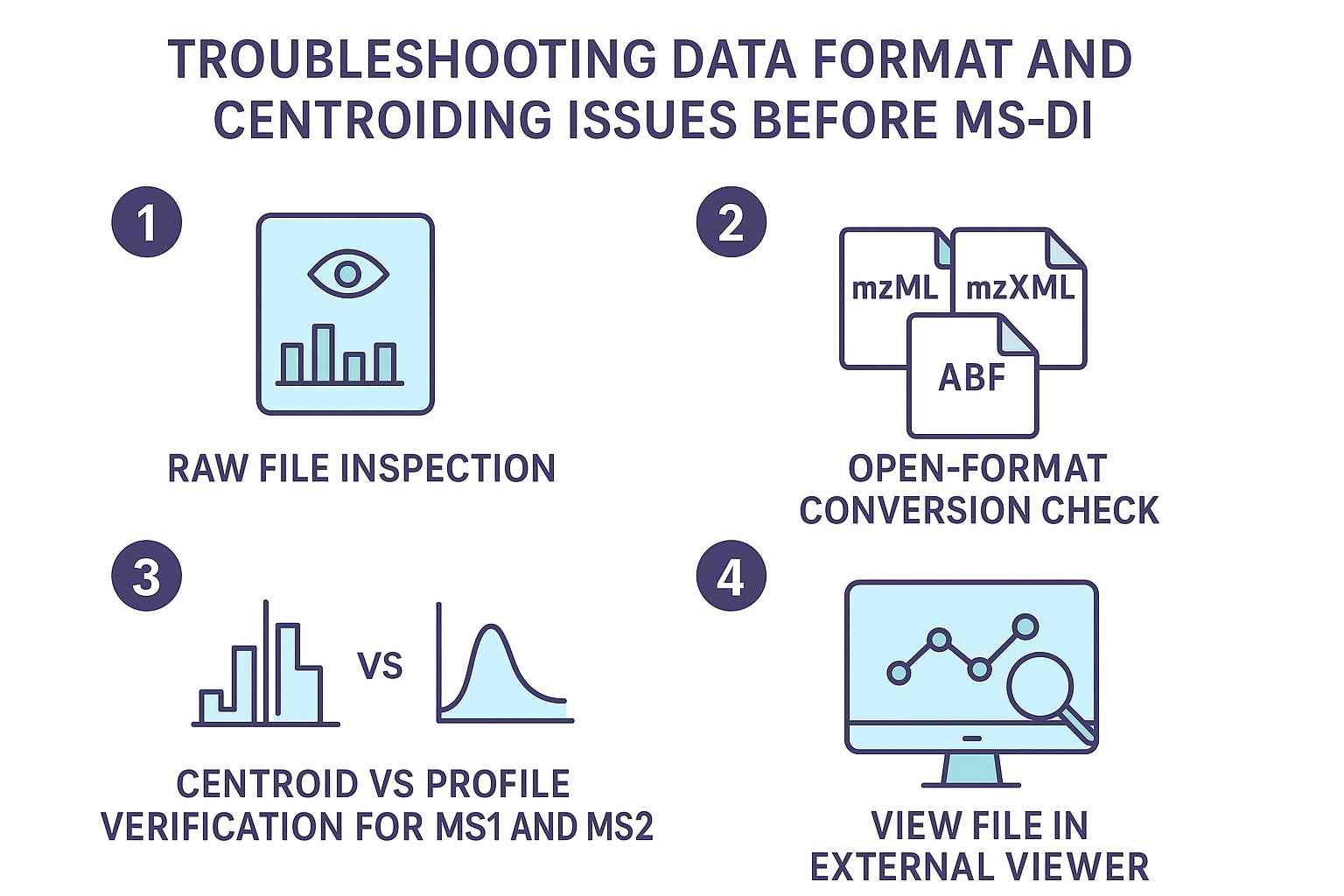
Check Your Data Format and Centroiding
Confirm Open-Format Conversion
MS-DIAL can work with a variety of inputs, but in many lab pipelines the critical step is conversion to open formats such as mzML/mzXML or vendor-specific intermediates like ABF. If your problem looks like MS-DIAL not importing MS2 (MS2 absent after import), treat conversion as the prime suspect.
At minimum, verify:
- Whether the data were imported directly from a vendor format or converted through mzML/mzXML/ABF.
- Whether the conversion workflow preserved MS2 scans and precursor-related metadata (precursor m/z, isolation window information, scan level, etc.).
- Whether your vendor has more than one export path—and whether you used the one that retains MS/MS and precursor fields.
If you're seeing MS-DIAL mzML conversion MS2 missing, don't assume MS-DIAL is "dropping" spectra on import. In many cases, MS2 was never written correctly into the mzML (or precursor annotations were simplified), which then prevents correct feature-to-MS2 linking downstream.
Verify Centroided MS1 and MS2
Centroid/profile mismatches are an underappreciated reason MS2 may appear to be missing. If the imported data type is inconsistent with the project setup or processing assumptions, peak detection, feature formation, and MS2 linkage may all be affected.
- weak or failed peak detection at MS1 (features never form),
- broken MS2 linkage (precursors are not detected robustly enough to anchor MS2), or
- fragment spectra that look "flat" after noise handling.
For troubleshooting, explicitly confirm the data type for both MS1 and MS2:
- If you centroided during conversion, confirm MS-DIAL startup settings reflect centroid for both levels.
- If you kept profile data, ensure your processing assumptions and project settings match.
Many labs notice the issue as a MS-DIAL centroid vs profile MS2 issue only after they compare a "working" dataset to a "non-working" dataset and realize the conversion pipeline changed.
Inspect the Files With a Viewer Before MS-DIAL
Before touching MS-DIAL parameters, open the converted file (e.g., mzML) in a compatible viewer and answer two simple questions:
- Do you see MS2 scans at all (scan level > 1)?
- Do MS2 scans include precursor-related fields and sensible fragment intensity patterns?
This step helps distinguish raw-data or conversion problems from MS-DIAL setup problems. If MS2 scans or precursor-related metadata are not visible in the converted file, MS-DIAL is unlikely to import or link them correctly.
Match the Project Type to the Acquisition Mode (DDA vs DIA MS2 problem)
A surprisingly common MS-DIAL DDA vs DIA MS2 problem is that MS2 is present, but MS-DIAL is interpreting it under the wrong acquisition logic.
DDA: Conventional LC-MS/MS Projects
In DDA, MS2 is typically precursor-linked by design: the instrument selects ions and fragments them with a recorded precursor m/z and isolation. For DDA-style datasets, use the DDA workflow and confirm that:
- precursor selection information is preserved through conversion,
- the project setup reflects DDA rather than all-ion/DIA,
- the expected polarity and scan settings are consistent across files.
If the project is created under the wrong mode, expected MS2 may not be linked correctly even when MS2 scans exist.
DIA: All-Ions, SWATH, and MSE Projects
DIA/all-ion-style acquisition changes the logic: MS2 is multiplexed, and the pipeline depends heavily on deconvolution and correct interpretation of isolation windows. If you treat multiplexed fragmentation as though it were DDA, you can easily conclude "MS2 is missing" when the real issue is that MS2 needs to be deconvoluted and assigned.
This is where MS-DIAL SWATH/MSE/all-ion MS2 troubleshooting becomes more about the project type and deconvolution strategy than about "finding" scans.
Common Project-Type Mistakes That Hide MS2
Most mistakes fall into a few patterns:
- Selecting a DDA workflow for all-ion/DIA data (MS2 exists but doesn't link like you expect).
- Treating vendor-specific DIA as standard LC-MS/MS without confirming how precursor/isolation info is exported.
- Importing ion mobility data into a non-matching project type (where additional dimensions may complicate linkage and representation).
When you see MS2 in the file but "none attached" to features, revisit acquisition-mode assumptions before touching spectral libraries.
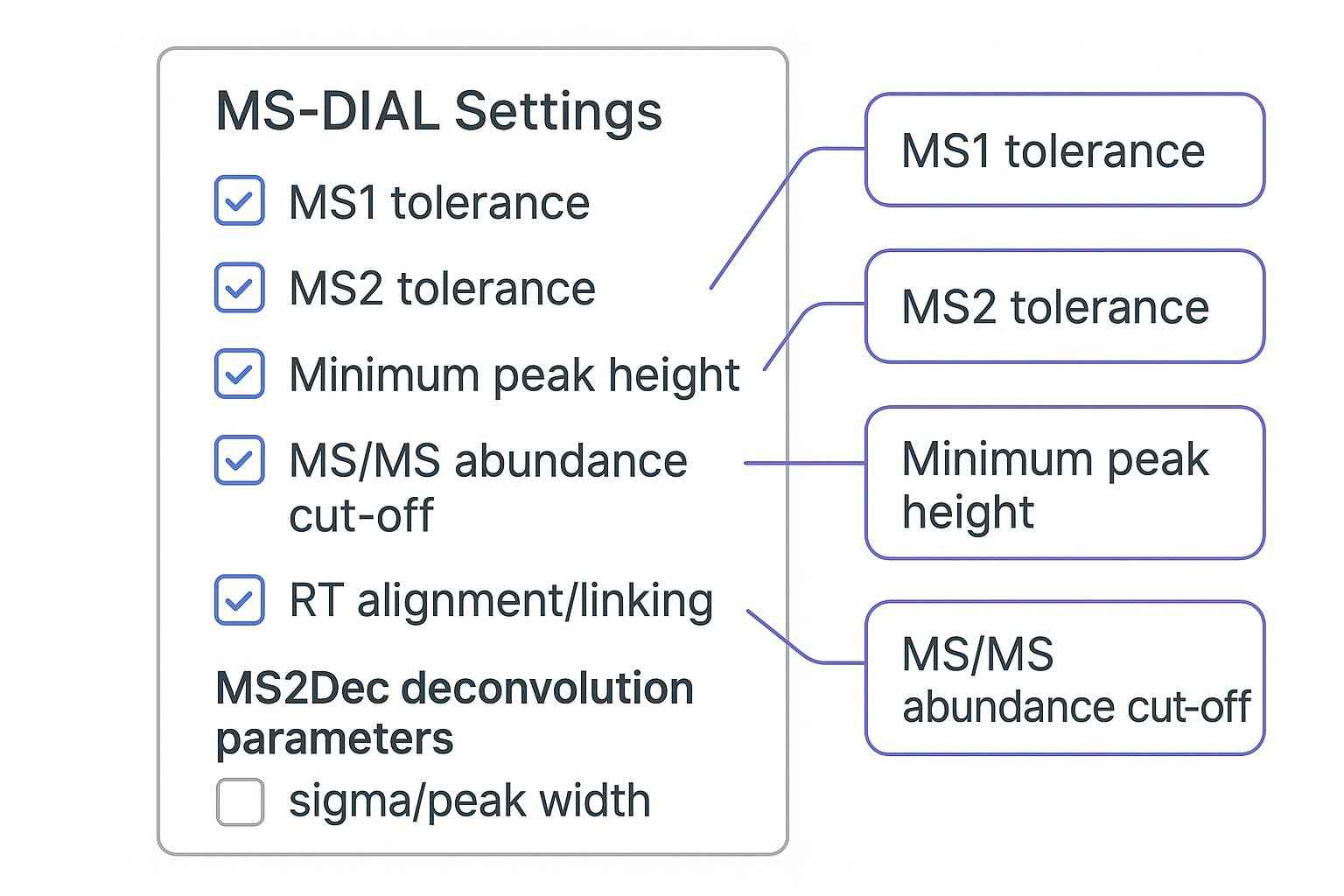
Tune Core Parameters Before Assuming MS2 Is Missing (MS-DIAL not detecting MS2 data)
Once you've confirmed MS2 exists and the project type is correct, parameter tuning becomes meaningful. This is where "missing MS2" often turns out to be filtering.
Check MS1 and MS2 Mass Tolerances
Overly strict tolerances can create a cascade:
- fewer MS1 peaks are recognized,
- fewer features survive alignment,
- fewer features get linked to MS2, and
- MS2-based annotation scores drop.
Treat tolerances as instrument- and acquisition-dependent. If you copied parameters from a different instrument or a different acquisition mode, you may have unintentionally suppressed usable spectra.
Lower Peak Height and MS/MS Abundance Thresholds for Troubleshooting
If your precursor feature isn't detected, MS2 can't be attached to it—even if MS2 scans exist. This is the practical reason a MS-DIAL minimum peak height / MS2 abundance cut-off issue often shows up as "MS2 not detected."
For diagnostics, temporarily relax:
- minimum peak height (to ensure low-intensity precursors still form features),
- MS/MS abundance cut-off (to avoid suppressing real fragments during noise filtering).
Then rerun a small subset (a few representative files) to see whether MS2 begins to appear at the feature level. Once you confirm the spectra are present and linkable, you can tighten filters to regain specificity.
Revisit RT Alignment and Feature-to-MS2 Linking
A key failure state is: MS2 exists, but the "expected feature" doesn't get the expected spectrum. This is often interpreted as MS-DIAL feature not linked to MS2, and it's frequently a linkage problem rather than an acquisition problem.
Focus on two ideas:
- Feature definition stability: if your peak detection is unstable across files, alignment can drift and alter which feature receives a given MS2.
- Linking logic: if the software links MS2 to a different (nearby) feature due to RT/mass proximity, your target looks like it has "no MS2" even though the run contains suitable spectra.
Review Deconvolution-Related Settings
If you're working with multiplexed MS2, or if co-elution is heavy, deconvolution becomes decisive. A MS-DIAL deconvolution MS2 problem often looks like: "I can see fragments, but the representative spectrum is wrong or too noisy to match."
Deconvolution parameters (such as sigma/peak width assumptions) can:
- suppress fragments that don't match expected peak shapes,
- blend fragments from co-eluting species,
- distort the representative spectrum used for library search.
If fragments exist but are being represented poorly, revisit deconvolution and linking before blaming the library.
Why MS2 May Exist but Still Not Be Used for Annotation
A common misunderstanding is that "no MS2-driven IDs" implies "no MS2." In reality, MS2 can be present but fail to support confident matching.
This typically happens when:
- spectra are noisy or sparse (low fragment coverage),
- deconvolution produces a mixed spectrum,
- the library doesn't contain close-enough references for your chemistry or instrument conditions,
- cutoffs are too strict for the dataset's signal-to-noise.
In these cases, MS-DIAL may rely on evidence other than accepted MS/MS similarity. In practice, w/o MS2 is generally interpreted as annotation without successful MS/MS matching, rather than proof that no fragmentation scans were acquired.
Practically, treat w/o MS2 as a flag to ask:
- Is the MS2 spectrum actually linked to the feature?
- Is the spectrum interpretable (enough fragments, not dominated by noise)?
- Is the library appropriate for the acquisition mode and collision conditions?
From an interpretation standpoint, MS2 that is present but not suitable for confident matching can be as limiting as truly missing MS2.
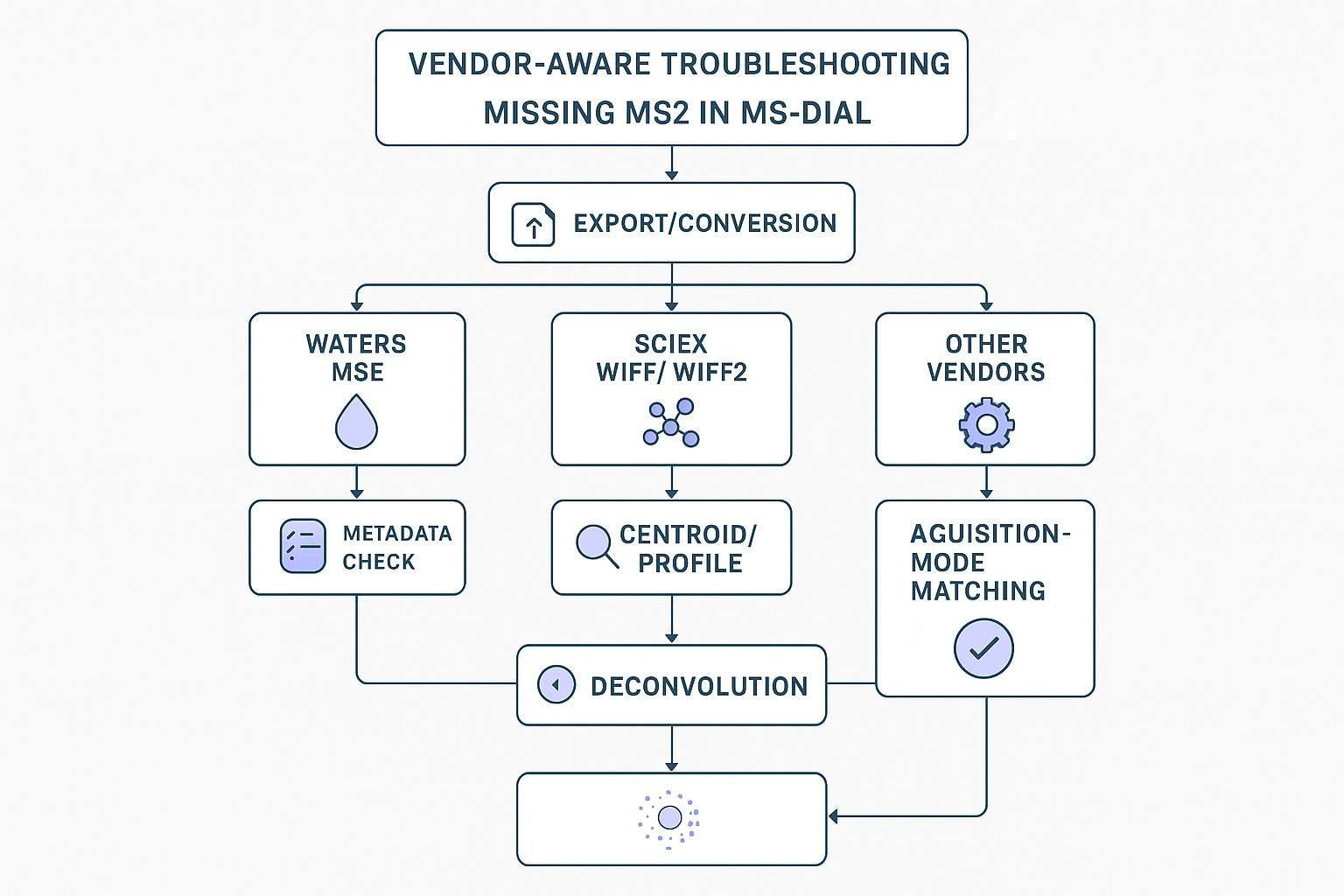
Vendor-Specific Pitfalls and Workarounds
Vendor export paths and metadata conventions can strongly influence whether MS2 is preserved and linkable.
Waters MSE and Related Export Paths
Waters MSE is often processed as a DIA-style workflow, and it may require extra attention to:
- export logic (ensuring both low-energy and high-energy functions are retained),
- lockmass handling/calibration behavior,
- choosing a DIA/all-ion project type rather than a conventional DDA interpretation.
If MSE data are processed under the wrong assumptions, the experience can look like "MS2 is missing," when the real issue is that MS2 must be treated as multiplexed fragmentation requiring appropriate deconvolution.
SCIEX WIFF Conversion Issues
For WIFF/WIFF2, conversion settings can change the effective data type and metadata fidelity. If WIFF behaves differently after conversion, recheck whether:
- centroiding occurred as intended,
- precursor annotations were preserved,
- your MS-DIAL data type settings match what the converted file actually contains.
It's also common for different conversion pathways (direct import vs mzML vs ABF) to require different peak-height expectations; a parameter set that works for one pathway can suppress signals in another.
Other Vendor Quirks to Watch
Some vendor datasets come with assumptions that are invisible until they break your pipeline—for example, calibration segment placement, file structure constraints, or scan-labeling conventions.
If one instrument repeatedly fails while others work, compare your workflow against vendor- and MS-DIAL-specific guidance before changing unrelated settings. The goal is to avoid repeated parameter changes when the root cause is actually missing or altered metadata.
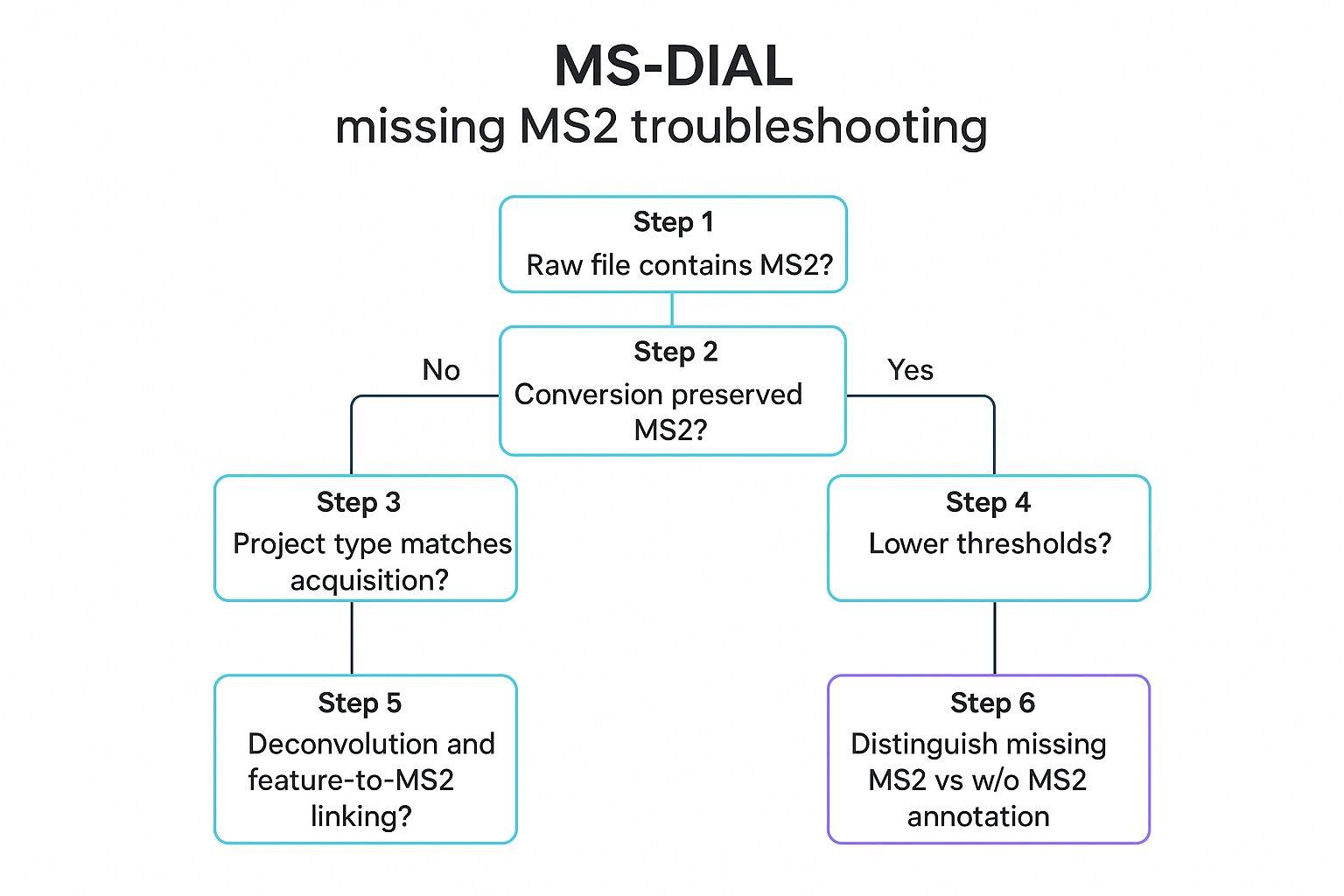
A Practical Diagnostic Workflow for Missing MS2 in MS-DIAL
The fastest way to resolve "missing MS2" is to apply a strict order of operations. This prevents you from changing ten parameters to fix a conversion issue.
Step 1: Confirm the Raw File Contains MS2
Open a representative raw file (or a vendor viewer) and verify that MS2 scans are actually present for the time window and m/z region where you expect fragmentation.
Step 2: Confirm the Conversion Preserved MS2
If you convert to mzML/mzXML/ABF, inspect the converted file with a viewer. Verify that scan levels, precursor information, and MS2 intensities look sane.
Step 3: Confirm the Project Type Matches the Acquisition Mode
If you have DIA/all-ion/MSE/SWATH-style data, confirm the project is built to interpret multiplexed MS2 correctly. Misclassification here is a top cause of "MS-DIAL MS2 not showing."
Step 4: Lower Detection and MS2 Filtering Thresholds
Temporarily relax minimum peak height and MS/MS abundance thresholds. Your objective is not perfect results yet—your objective is to confirm the MS2 is detectable and linkable.
Step 5: Recheck Deconvolution and Feature-to-MS2 Linking
If you see fragments but they're not assigned correctly (or the representative spectrum is implausible), revisit deconvolution and linkage settings. Co-elution and DIA multiplexing make this step critical.
Step 6: Distinguish Missing MS2 From w/o MS2 Annotation Cases
If MS2 exists but IDs are w/o MS2, treat that as an annotation/quality issue rather than an import issue. Validate spectral quality, library suitability, and cutoff logic.
How to Fix the Most Common MS2 Detection Problems
Rebuild the Project With the Correct Acquisition Mode
If you suspect a project-type mismatch, the cleanest fix is often to rebuild the project using the correct mode (DDA vs DIA/all-ion vs MSE/SWATH, and any mobility dimensions if present). Don't assume MS-DIAL will infer the mode purely from the file.
Reconvert the Files if Needed
If the import path is suspect, regenerate a clean open-format dataset and keep notes on:
- the conversion parameters (especially centroiding choices),
- any warnings/errors,
- whether precursor metadata is preserved.
This is the most direct response to MS-DIAL mzML conversion MS2 missing scenarios.
Relax Filtering Parameters During Diagnosis
During diagnosis, use thresholds that prioritize sensitivity over speed:
- lower minimum peak height enough to capture low-intensity precursors,
- reduce the aggressiveness of MS/MS abundance filtering.
Once MS2 appears consistently at the feature level, tighten thresholds in controlled increments and document the effect.
Reevaluate Deconvolution Before Focusing on Annotation
If fragments exist but don't match well, prioritize deconvolution and feature-to-MS2 linkage. Otherwise, you risk tuning library settings to compensate for a spectrum-generation issue.
In other words, if the representative spectra are incorrect or poorly reconstructed, adjusting annotation settings is unlikely to resolve the underlying problem.
Validate the Fix Before Moving to Annotation
After you apply a fix, validate it the way you'd validate an analytical method change: with sanity checks, a known-good subset, and documentation.
Practical checks include:
- test the workflow on demo data or a known-good dataset if available,
- confirm that feature tables now include the expected MS2 fields (where applicable),
- confirm that centroided spectra in the spectrum viewer look like chemically plausible fragment patterns,
- if your downstream goal is export for other tools (e.g., spectral review workflows), recheck export settings after you confirm MS2 is present and linked.
At this stage, it's also a good time to write down the "working" parameter set as a lab SOP—especially if multiple students or core facilities share the pipeline.
If you need an external check on whether spectra quality and annotation confidence are adequate for publication, it can be helpful to sanity-check with an independent analysis workflow. For teams that want a second-pass review, Metabolomics Data Analysis support can help validate preprocessing choices, annotation confidence, and downstream statistical interpretation.
Common Mistakes That Make MS2 Problems Worse
Most troubleshooting spirals come from changing the wrong thing too early.
- Adjusting library or annotation settings before verifying raw-data import and conversion
- Troubleshooting identification without confirming acquisition mode
- Assuming all missing identifications are caused by missing spectra
- Using production-level thresholds too early during diagnostics
- Repeating parameter changes without documenting what was tested (making the process non-reproducible)
If you can't explain what changed—and what it changed in the output—you can't defend the result in a methods section.
When the Problem Is Probably in the Data, Not MS-DIAL
Sometimes the software is fine, and the limitation is intrinsic to the run.
This is more likely when:
- the raw/converted file contains incomplete fragmentation information,
- the acquisition method generated little useful MS2 for your targets (e.g., low intensity, suboptimal collision energy, dynamic exclusion behavior),
- inclusion/exclusion rules changed which ions were actually fragmented,
- vendor-specific export dropped precursor or fragmentation metadata.
If you're in this situation, the most productive "fix" may be methodological: adjust acquisition (if possible) or plan a confirmation strategy. In academic projects, a common approach is to use discovery workflows to generate hypotheses and then confirm key findings with a targeted method.
For confirmation-oriented follow-up, Targeted Metabolomics Analysis Service can be a pragmatic next step when MS2-based confidence is required for a small set of metabolites.
Frequently Asked Questions
Why can I see MS2 in the raw file but not in MS-DIAL?
In most cases, the MS2 data are not truly absent. They are being lost, hidden, or not linked correctly during import or feature processing. The first things to check are whether the project type matches the acquisition mode, whether file conversion preserved precursor-related metadata, and whether minimum peak height or MS/MS abundance cut-offs are too strict. If the precursor-feature relationship is filtered out, the MS2 may look missing even though fragmentation scans are present in the run.
What does w/o MS2 mean in MS-DIAL?
It means MS-DIAL did not use MS/MS similarity as successful identification evidence for that feature. Instead, the software relied on other information such as precursor mass, isotope pattern, or retention behavior. This does not necessarily mean the raw data contained no MS2. It means the available MS2 was not accepted or used successfully for that particular annotation under the current settings.
Can minimum peak height cause missing MS2?
Yes. If the precursor feature is never detected, or is detected too inconsistently, MS-DIAL cannot link the expected MS2 to that feature. In that case, the MS2 may appear to be missing at the feature level even though MS2 scans do exist in the raw data.
Should I troubleshoot conversion first or annotation first?
Start with raw-file and conversion verification. Then confirm that the project type matches the acquisition mode. After that, lower key thresholds if needed to confirm that MS2 can be linked correctly. Only once those steps are complete should you adjust deconvolution or annotation-related settings.
Why does MS-DIAL show MS2 in the spectrum viewer, but library matching is still weak?
This usually means the MS2 data are present but not well suited for spectral matching. Common reasons include mixed spectra caused by co-elution, MS2 mass tolerance settings that are too strict for the instrument, or library spectra that do not match the collision energy, adduct type, or fragmentation behavior of your data. In these cases, the issue is not that MS2 is missing, but that the available MS2 is not strong enough or clean enough to support confident library matching.
How can I tell the difference between "MS-DIAL not importing MS2" and "feature not linked to MS2"?
If MS2 is missing throughout the entire project, the problem is more likely related to file import or conversion. If MS2 exists in the project but is absent only for specific target features, the problem is more likely related to feature linking, thresholds, alignment, or deconvolution. A practical way to distinguish the two is to inspect the converted file in an external viewer and then check whether other high-intensity features in MS-DIAL show linked MS2.
What is the most common mistake when working with SWATH, MSE, or all-ion data in MS-DIAL?
The most common mistake is treating multiplexed MS2 data like conventional DDA data. In DIA or all-ion workflows, the MS2 spectrum for a precursor often has to be reconstructed through deconvolution rather than being recorded as a clean, isolated precursor spectrum. If the wrong project type or workflow is selected, the MS2 may appear to be missing, incomplete, or unusable even when the raw data are correct.
Next steps
If you've confirmed MS2 is present and linkable but annotation confidence is still limited, consider whether you need deeper spectral interpretation, curated annotation, or a structured confirmation plan for key pathways/metabolites. For discovery-driven projects, Untargeted Metabolomics Service can support robust profiling with QC and interpretation workflows aligned to publication deliverables.
References
- MS-DIAL: data-independent MS/MS deconvolution for comprehensive metabolome analysis
- Data Processing Thresholds for Abundance and Sparsity and their Influence on the Ability to Detect Differences Between Samples in Untargeted Metabolomics Data
- MS-DIAL 5 multimodal mass spectrometry data mining unveils complex lipid and metabolite structures

 Contact Us